Inkling-2-Mini on Apple M4 32GB: Testing LM Studio, Ollama and MTPLX
Test date: 24 November 2026. These are my measurements on one Apple M4 computer with 32 GB of memory. The model files, memory usage and system conditions differed, so these results are useful for choosing a setup on this machine, but they are not a controlled ranking of inference engines.
The same model can feel very different depending on how you run it. To see what Inkling-2-Mini is like on my Mac, I tested it with LM Studio, Ollama and MTPLX, recording generation speed, memory use and a few functional checks.
In this test, LM Studio was the fastest and most consistent setup, at approximately 15–16 tokens per second. Ollama's four recorded runs ranged from 9.9 to 13.0 tok/s; MTPLX's default MTP runs ranged from 8.4 to 13.2 tok/s.
The three setups did not use identical model files, and the Ollama run involved substantially more swap usage. Those differences can affect the results, so these numbers alone do not establish which engine is inherently faster.
Test setup
| Item | Configuration |
|---|---|
| Computer | Apple M4, 10 cores, 32 GB memory |
| Operating system | macOS, Darwin 27.2 |
| Model | thinkingmachines/inkling-2-mini |
| Architecture | 26.4B-parameter mixture of experts (MoE); approximately 3.4B parameters active per token |
| Context setting | 16K |
| Reasoning effort | none, the lowest setting |
| Temperature | 0.3 |
| Maximum output | 200–300 tokens, except where otherwise noted |
I used the same English prompt three times: “Write a short paragraph about Kuala Lumpur.” I also included a coding prompt asking for a prime-number function.
Speed calculation: actual output tokens reported by the service divided by generation time, rather than the number of streaming chunks. The test record does not map every individual result to a specific prompt, so I have not assumed which run belongs to which task.
LM Studio used its built-in llama.cpp engine, version 2.82.0; it was not a separate llama.cpp installation.
Results at a glance
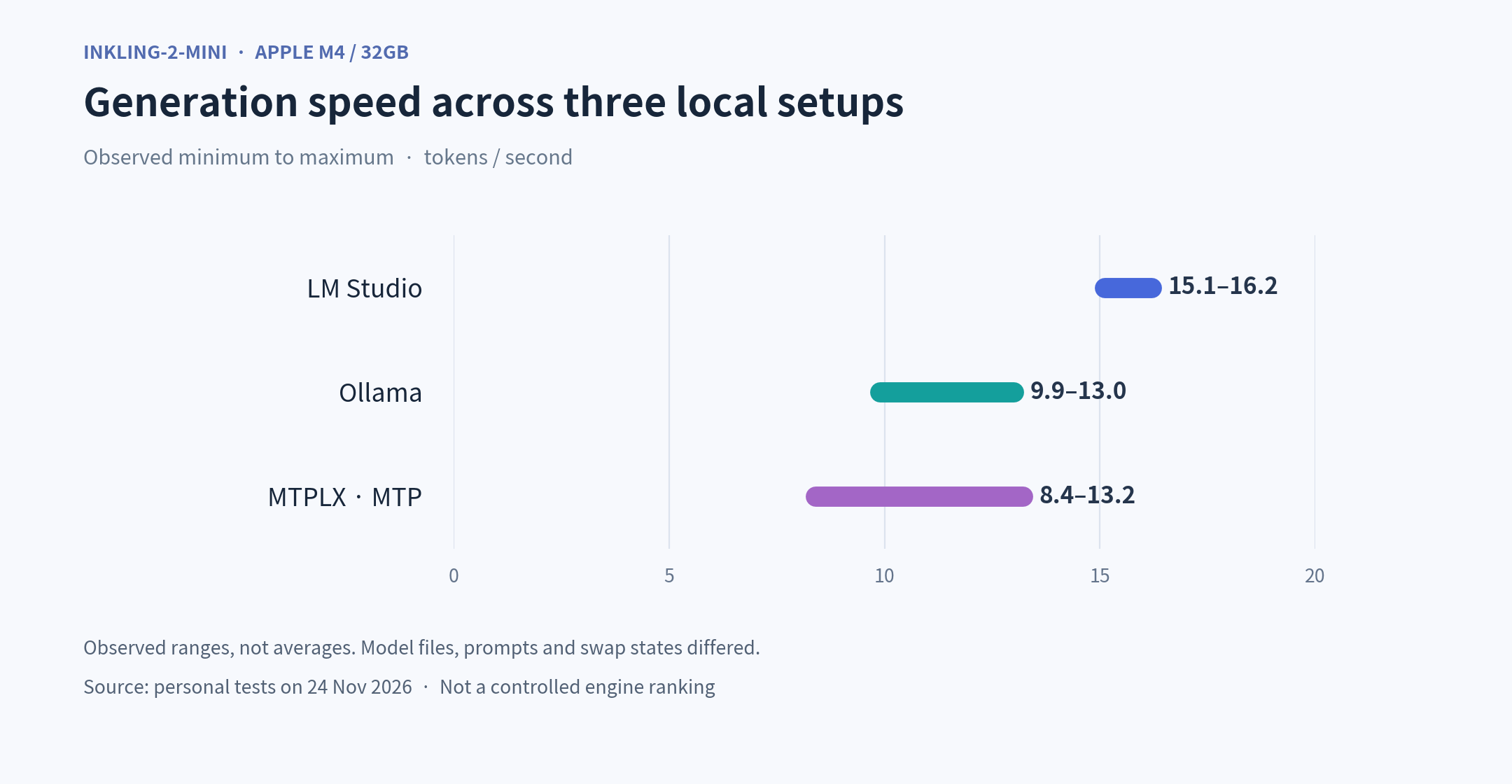
The chart shows the lowest and highest recorded values, not averages. Model files, test tasks and swap conditions differed; this is not a controlled engine ranking.
| Setup | Model file | Generation speed | Memory and swap during test |
|---|---|---|---|
| LM Studio, built-in llama.cpp | lmstudio-community Q4_K_M, 16 GB | Approximately 15–16 tok/s, relatively consistent | 16.88 GiB loaded; swap was 0 during the speed test |
| Ollama 0.40.17 | Official 20 GB model using MLX | 10.2, 11.0, 9.9, 13.0 tok/s | Approximately 22 GB occupied; display showed 100% GPU; approximately 3.2 GB swap used out of 4 GB |
| MTPLX 2.13.2 | Bare Speed package, 16 GB | Default MTP: 8.4, 8.7, 9.1, 13.2 tok/s | Approximately 9 MB swap during testing |
Tokens per second describe generation throughput. They do not measure total response time or model quality on their own.
LM Studio: Consistent speed and a successful tool call
On this machine, LM Studio was the most consistent of the tested setups.
Three recorded runs with --parallel 4 produced 16.0, 15.7 and 16.1 tok/s. Two runs with --parallel 1 produced 16.2 and 15.1 tok/s. This small sample showed no obvious speed difference between the settings, but it does not establish concurrent throughput: I did not test multiple simultaneous requests.
Time to first token was approximately 0.3–0.9 seconds. I observed no speed difference between none and low reasoning effort in this test. Any effect on the amount of generated content needs to be assessed for the specific request.
I also ran one simple tool-call check. The model called get_weather with {"city":"Kuala Lumpur"} correctly, taking 6.7 seconds. This establishes that this particular case passed; it does not establish tool-call reliability across other tasks.
Watch the output limit at high reasoning effort
In one test using the default high setting, 381 of the 400 tokens were spent on reasoning, and the response was truncated before the code appeared. If a response spends a long time reasoning and does not finish, check both reasoning effort and the output-token limit. One test does not establish that this will happen on every task.
MTP speculative decoding did not start
An attempt to load MTP speculative decoding failed. The test record states that this GGUF file did not contain the required MTP header, so this file did not support the attempted MTP configuration. That does not mean all GGUF files or other model files lack MTP support.
Ollama: Higher swap usage during testing
Ollama needed an upgrade from 0.6.0 to 0.40.17 to support the model in this test. A warm-up result of 4.5 tok/s was excluded from the recorded comparison.
The four measured results were 10.2, 11.0, 9.9 and 13.0 tok/s.
The display showed approximately 22 GB in use, 100% GPU and roughly 3.2 GB of swap in use. The tests ran sequentially, and swap was already in use during the Ollama test. Since I did not isolate that factor, I cannot quantify its effect on speed.
One prompt-processing reading was an implausible 1.39 million tok/s. I did not use that reading in the comparison.
MTPLX: Testing different decoding modes
MTPLX used the 16 GB Bare Speed package, with almost no swap in use during its test.
| Mode | Recorded results |
|---|---|
| Default MTP | 8.4, 8.7, 9.1, 13.2 tok/s |
| Autoregressive | 9.0–11.5 tok/s |
| MTP depth 1 | 9.0–13.3 tok/s |
The warm-up result was 14.07 tok/s. The official tune command did not support Inkling in this test, so it did not provide a faster configuration.
A Chinese-language test on MTPLX produced 6.6 tok/s. I did not test LM Studio or Ollama with the same Chinese prompt, so that number cannot be used for a cross-setup comparison.
A vendor advertised 85–128 tok/s on an M5 Max; I did not reproduce that on the M4. The machines and test conditions differ, so that advertised figure should not be treated as an expectation for this computer.
What these results show
For this machine, these model files and these short-prompt tests:
- LM Studio delivered the strongest speed and consistency in this sample, at approximately 15–16 tok/s.
- One simple LM Studio tool-call test passed. Tool use was not tested on the other two setups.
- Reasoning effort and output limits can affect whether a response finishes: the high-effort coding test was cut off after reasoning used most of the token allowance.
- Swap usage was higher during the Ollama test, making a repeat under more comparable memory conditions worthwhile.
If I were choosing a starting point for this M4 today, I would try the LM Studio configuration first. To choose a setup for sustained work, I would also test output quality, representative tasks and the real workload.
Limitations and next steps
This was not a controlled benchmark:
- It used one computer and only a small number of recorded runs per setup.
- The model files differed: a 16 GB Q4_K_M file, a 20 GB official model and a 16 GB MTPLX package. Differences in model versions, quantization or packaging may affect speed and quality; output quality was not compared.
- Tests ran sequentially. Swap usage was higher during the Ollama test, and system state was not isolated.
- I did not test long contexts, image input, concurrent throughput or thermal throttling during sustained operation.
- Tool use was not tested on Ollama or MTPLX, and the Chinese prompt was tested only on MTPLX.
- The record is insufficient to confirm that timing and token-counting conventions were identical across the three setups.
A stronger follow-up would align model version and quantization where possible, use the same prompts and generation settings, record memory conditions before and after each run, and repeat the tests more often. It should also measure both speed and quality for English, Chinese, code, tool calls and long-context tasks.
Conclusion: In this M4 / 32 GB test, LM Studio is a reasonable first setup to try. The actual performance gap between the engines under matched conditions remains an open question.