Why Is Splash So Fast on Apple Silicon? How It Works, the Trade-offs, and What I Measured on an M4
Splash is an open-source (Apache-2.0) inference engine from Inco AI for Apple silicon. Its headline numbers are big: on Qwen3.8-27B, its documentation reports decode speed 4.5-5.3x that of llama.cpp on an M5 Pro and an M3 Max. I wanted to know where that comes from, what it costs, and how much of it shows up on a base M4.
Short answer: the speed comes from design choices stacked together, mainly speculative decoding plus an engine built for a small set of models. On my M4 the gain was real but much smaller than the headline, and it depended on the workload.
Why it is fast
1. Speculative decoding is the default path
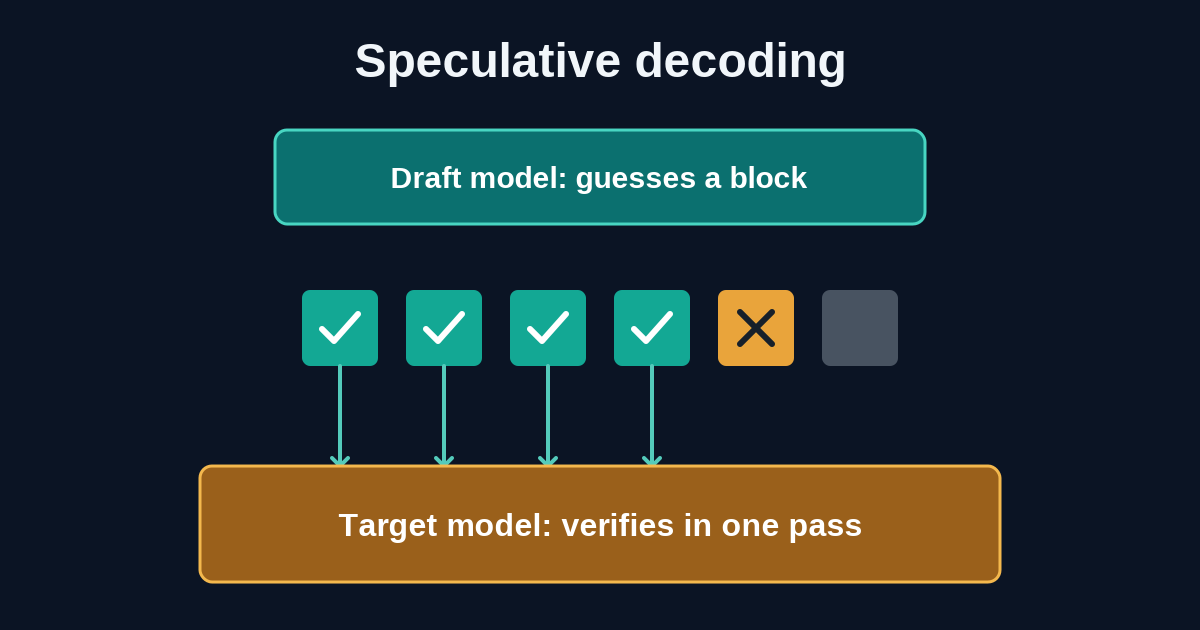
A language model normally produces one token per forward pass. Speculative decoding adds a small draft model that guesses several tokens ahead. The large target model then checks the whole block in one pass. Tokens up to the first wrong guess are kept, and the rest are thrown away.
This works because on Apple silicon, decoding is usually limited by how fast weights can be read from memory. Checking several tokens in one pass costs far less than several separate passes.
Splash uses DFlash 2, which differs from a classic draft model in three ways:
- The draft is parallel. It predicts every position of the block at once, instead of one token at a time.
- A path selector. It keeps the top 16 candidates per position and picks a coherent sequence through them, so neighbouring guesses fit together.
- A light local convolution that reduces the accuracy drop toward the end of a block.
Inco reports that for Qwen3.8-27B, DFlash 2 gets 4.80 tokens accepted per verification pass on average, against 4.28 for the model's own multi-token prediction (MTP).
2. The engine is built around the model
General engines such as llama.cpp are designed to run almost anything. Splash supports only a handful of model families and ships precompiled Metal kernels written for their exact shapes: separate ones for prefill (large batches) and for verification (small blocks), and dedicated ones for mixture-of-experts (MoE) routing.
3. Less overhead per step
Drafting, verification, acceptance and state updates are submitted together instead of one by one. Otherwise per-step overhead would eat much of the speculative gain.
4. It reuses what it already read
KV cache is stored in pages indexed by prefix, so a request that starts like an earlier one skips that work. This matters most for coding agents, which resend a growing conversation every turn. The KV cache is 8-bit by default, and an SSD cache keeps evicted state.
5. Memory is planned in advance
Because the model sizes are known, Splash sets a memory budget at startup and schedules requests inside it. On dense models such as the 27B it can also use the Neural Engine for long prompts.
What I measured on a base M4
Machine: Apple M4, 10-core GPU, 32 GB RAM. Model: Inkling-2-Mini Q4_K_M, the same GGUF file and vision projector for both engines. Splash 1.7.3 against llama.cpp built from source (commit 12d47ba), 16K context.
I ran the whole comparison in two sessions on the same evening (27 November 2026). In each session the engines alternated, two runs each, with the same prompts and settings.
- Session 1: heavy memory pressure, about 10 GB of swap for most runs.
- Session 2: shortly after a reboot, about 0.6 GB of swap at the start, rising to 4-5 GB, with background tasks still active.
Each cell shows llama.cpp → Splash, as a range over the two runs.
| Case | Session 1 | Session 2 |
|---|---|---|
| Code, decode (tok/s) | 12.2-16.6 → 18.9-19.4 | 10.6-11.7 → 18.2-19.9 |
| English prose, decode (tok/s) | 11.6-16.2 → 16.1-17.3 | 9.1-10.3 → 10.9-13.0 |
| Chinese, decode (tok/s) | 11.6-15.7 → 15.7-16.6 | 8.6-10.1 → 12.0-12.9 |
| 4,000-token prompt, first token (s) | 61-64 → 29 | 79-82 → 33-36 |
| Same prompt, decode (tok/s) | 11.0-11.4 → 20.0-20.9 | 9.8-10.2 → 17.1-18.3 |
| Image question, decode (tok/s) | 11.8-12.6 → 24.5-24.9 | 10.8-11.4 → 20.0-21.6 |
| Server start until ready (s) | 11-24 → 30-91 | 10-12 → 33-34 |
- On the long prompt, Splash reached the first token 2.1-2.5x sooner and decoded about 1.7-1.8x faster.
- On the image case, decode was about 1.75-2.1x faster.
- On short prompts the gain was smaller and less stable: about 1.0-1.55x in session 1 and 1.2-1.9x in session 2.
- Both engines answered the long-prompt lookup and the image question correctly in every run. I did not compare quality beyond that.
Session 2 was mostly slower for both engines, even with less swap. I expected the opposite. Swap alone does not explain it, and I have not identified the cause.
Read these with caution. Neither session was a clean, idle machine, each case was a single request per run, timing was measured on the client, and Splash ran with idle release and SSD cache turned off.
Why my numbers are far from 4.6x
Several things differ from the published benchmark, and I have not isolated how much each one matters:
- Different model. The 4.5-5.3x figure is for a dense 27B. For the 35B MoE, Splash's own documentation reports 2.5-3.2x. Inkling is also MoE.
- Different chip. M5 Pro and M3 Max have 20-40 GPU cores and much more memory bandwidth than a base M4.
- Different prompts. The vendor used coding prompts. Predictable text such as code tends to be easier to draft.
- Different baseline. The llama.cpp comparison used default settings with no speculation (and, for the 27B, a second run with MTP). llama.cpp can also run DFlash drafts, which neither their table nor my test compares.
The trade-offs
| You gain | You give up |
|---|---|
| Speculative speed with no tuning | Only a short list of model families is supported |
| Kernels tuned for those models | Apple M3 or newer and macOS 26.4 or later only |
| Faster decode | Extra memory and disk for the draft (about 1 GB for Inkling, 3.85 GB for Qwen3.8-27B) |
| Smaller KV cache (INT8) | Outputs are not bit-identical to llama.cpp, and greedy runs may not repeat exactly |
| SSD cache for long sessions | SSD writes; set --max-cache-disk or a daily write budget |
| Memory released when idle (after 10 minutes by default) | The first request after a pause is slower |
| One-line setup | A young, fast-moving project; check the open issues before relying on it |
On output fidelity: speculative decoding with verification is designed not to change what the target model would produce, but an engine's arithmetic still matters. Inco reports that for the 27B, Splash and llama.cpp rank the same token first at 99.30-99.45% of positions, measured with a BF16 KV cache rather than the default INT8.
One security note: the server has no authentication by default. It listens only on localhost, so if you put it behind a tunnel or proxy, add an API key.
Memory is the other practical limit. Inco recommends 48 GB or more for the 4-bit Qwen3.8-27B. On 24 GB Macs you need smaller quantizations.
Try it
If you already have a supported GGUF, you only need to download its draft:
brew install incoai/tap/splash
splash serve --model local/inkling-2-mini \
  --model-dir /path/to/Inkling-2-Mini-Q4_K_M.gguf \
  --mmproj /path/to/mmproj-Inkling-2-Mini-BF16.gguf \
  --draft-model /path/to/Inkling-2-Mini-DFlash2 \
  --max-context 16K
The draft is incoai/Inkling-2-Mini-DFlash2 on Hugging Face. The server speaks OpenAI and Anthropic style APIs on port 8000.
Should you use it?
- Worth trying if your Mac meets the requirements, your model is on the supported list, and you work with long contexts: coding agents, long documents, repeated prompts.
- Stay with llama.cpp or LM Studio if you need a model Splash does not support, want to experiment with many models, or run older hardware.
- Either way, measure on your own machine. The headline number belongs to someone else's chip, model and prompts.
Sources
Vendor figures are quoted from the sources above as of 27 November 2026 and were not reproduced by me. The M4 table is my own measurement.